How to use Field calculator to calculate complex calculations and populate desired result in any of the field?
Introduction
Managing calculations across multiple fields can be tricky in any CRM. Often, sales teams need to automate complex logic such as percentage commissions, conditional values, or aggregate metrics like averages and totals. To make this process easier, Kylas provides the Field Calculator App, which allows you to define formulae, apply mathematical and logical operators, and automatically populate results into CRM fields.
With the Field Calculator, you can go beyond simple arithmetic — it supports IF conditions, logical operators, percentage calculations, and aggregation functions (SUM, AVG, MIN, MAX, COUNT). This ensures that repetitive calculations are automated, error-free, and available directly inside your CRM workflows.
This article covers everything you need to know about using the Field Calculator in Kylas — from prerequisites, setup, and installation, to creating formulae, applying workflows, and exploring advanced use cases.
Table of Contents
-
Prerequisites
-
Steps to Install the Application
-
How to Set Up a Calculation Formula
-
How to Use the Formula in Workflows
-
Advanced Formula Options
-
Use Cases
-
Benefits
-
Conclusion
1. Prerequisites
Before you begin, ensure you have the following permissions and plan access:
Permissions:
-
Products and Services → Read / Read All permission
-
Related Entity permission enabled
-
Product Plan:
-
Available in Elevate plan
-
Steps for Using and Installing Field calculator
- Steps to Install the Application
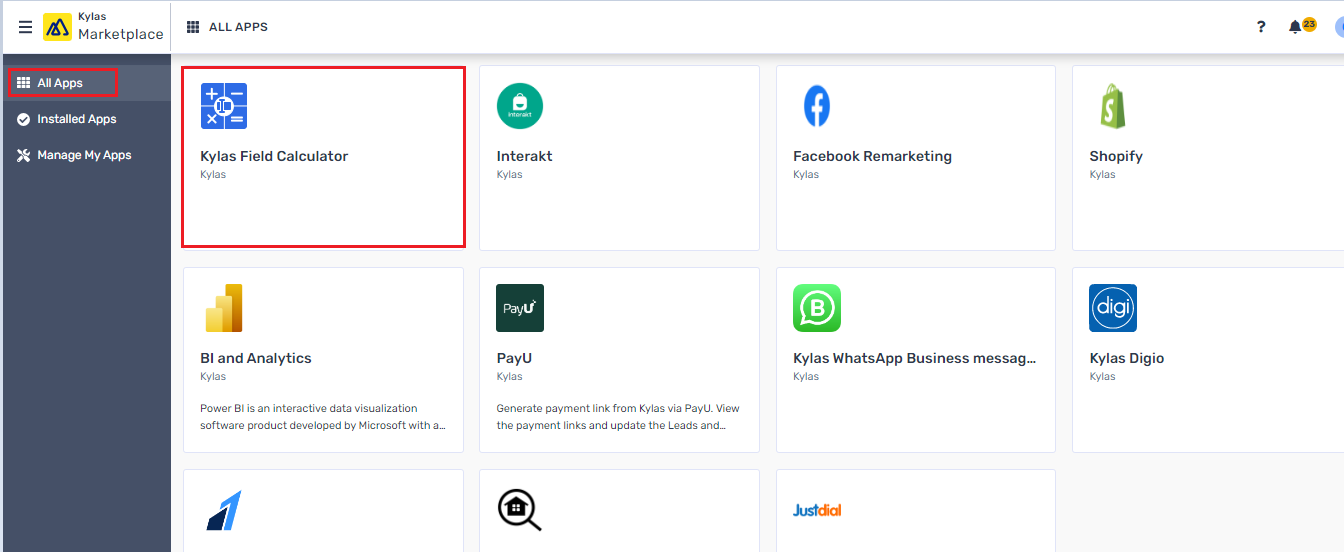
- Locate the Kylas Field Calculator app in the All-Apps menu under the Kylas Marketplace
- Click on the app and then 'Install App' button
- Login using the Kylas Sales details and then click on the 'Allow and Install'
- After installation Sign-up for the app
- Verify your email to login the app and enter the Kylas API key
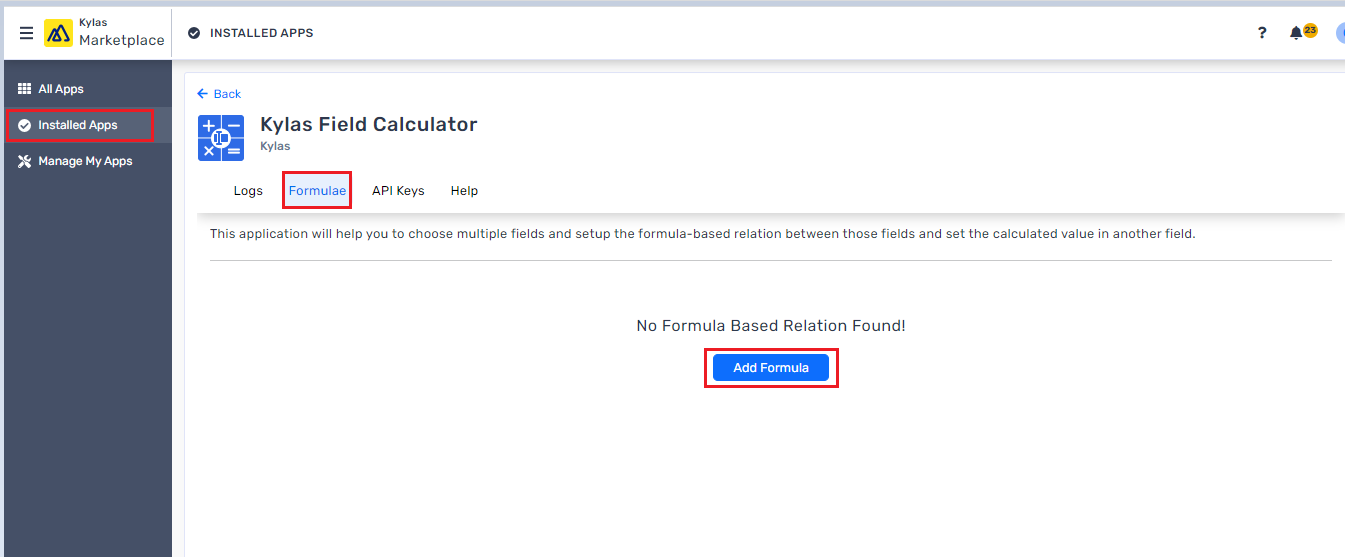
- Navigate to 'Installed Apps' and click on 'View Details' for the Kylas Field Calculator app.
- How to set up a Calculation Formulae:
- Login to the Kylas Field Calculator app
- Navigate to the Formulae tab and click on the 'Add Formula' button
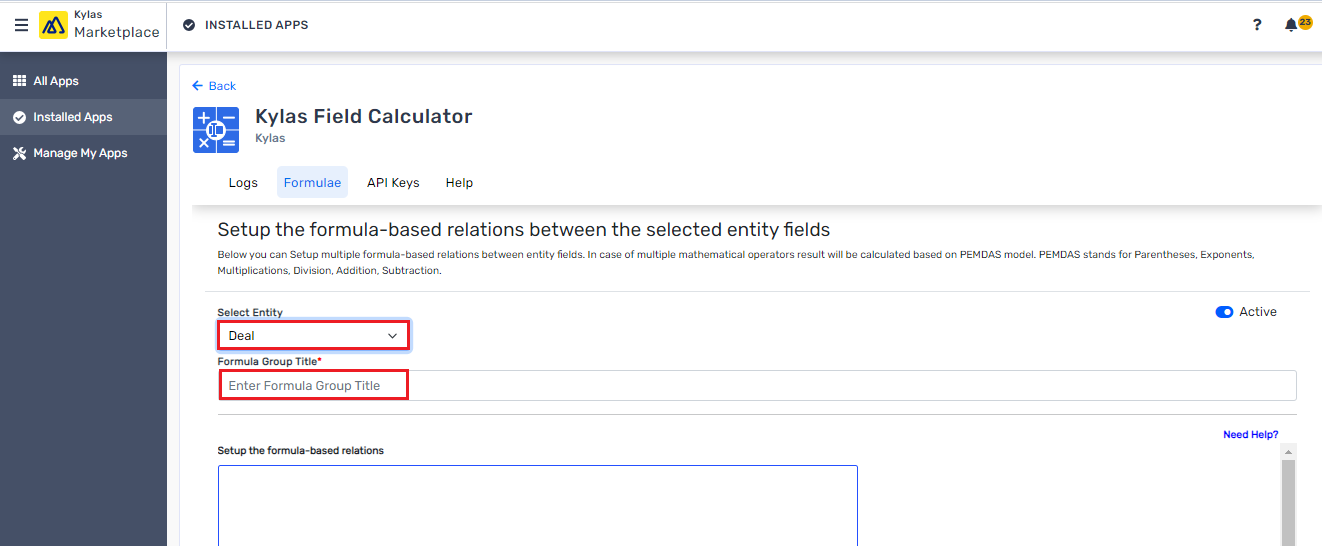
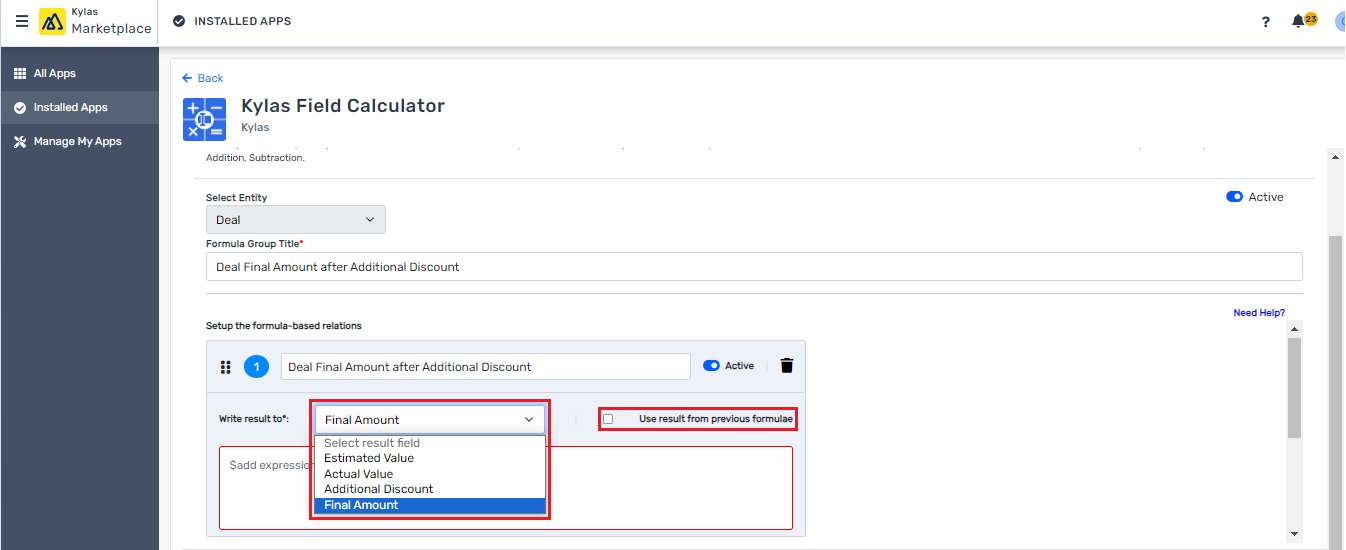
- Select the entity from the drop-down for which the calculation needs to be performed
- Give a title/name to the group (You can include 1 or more formulae in a group)
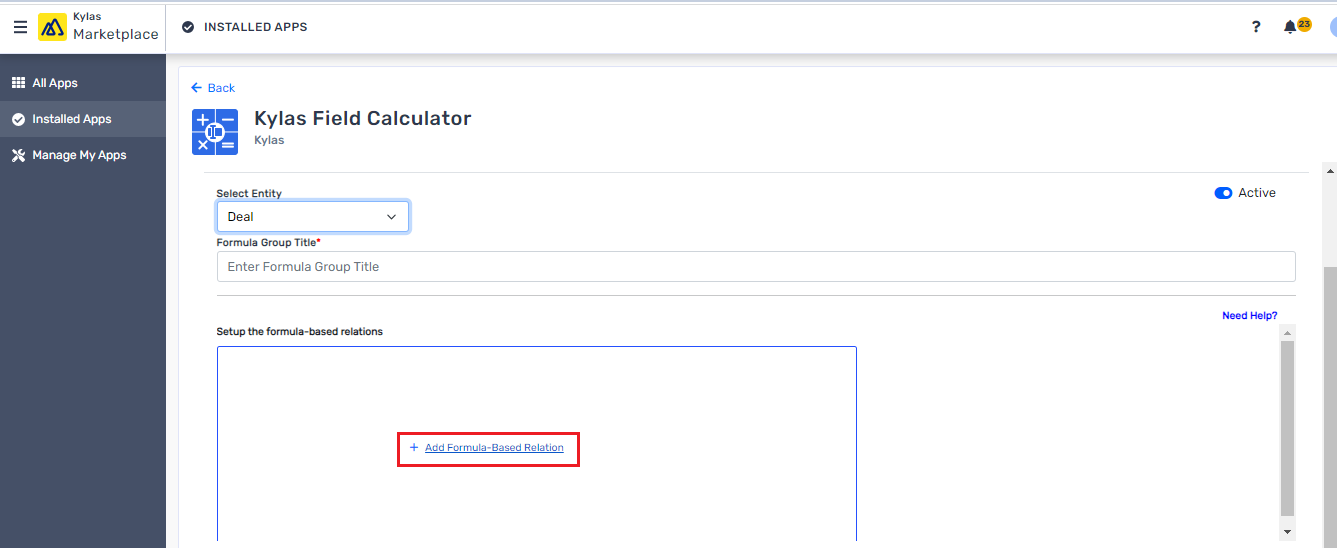
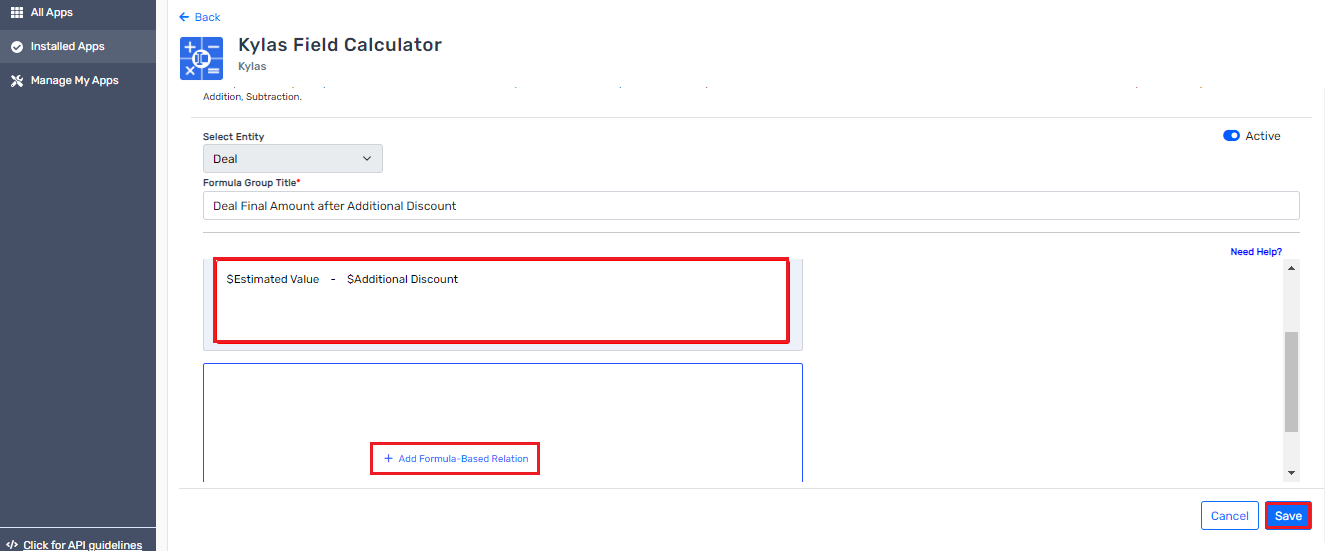
- Click on the '+ Add Formula-Based Relation' to set the calculation
- Select a field from the 'Write Result to' drop-down into which the calculation result will be updated. Also, you can select the checkbox if you want to use values derived from previous formulae.
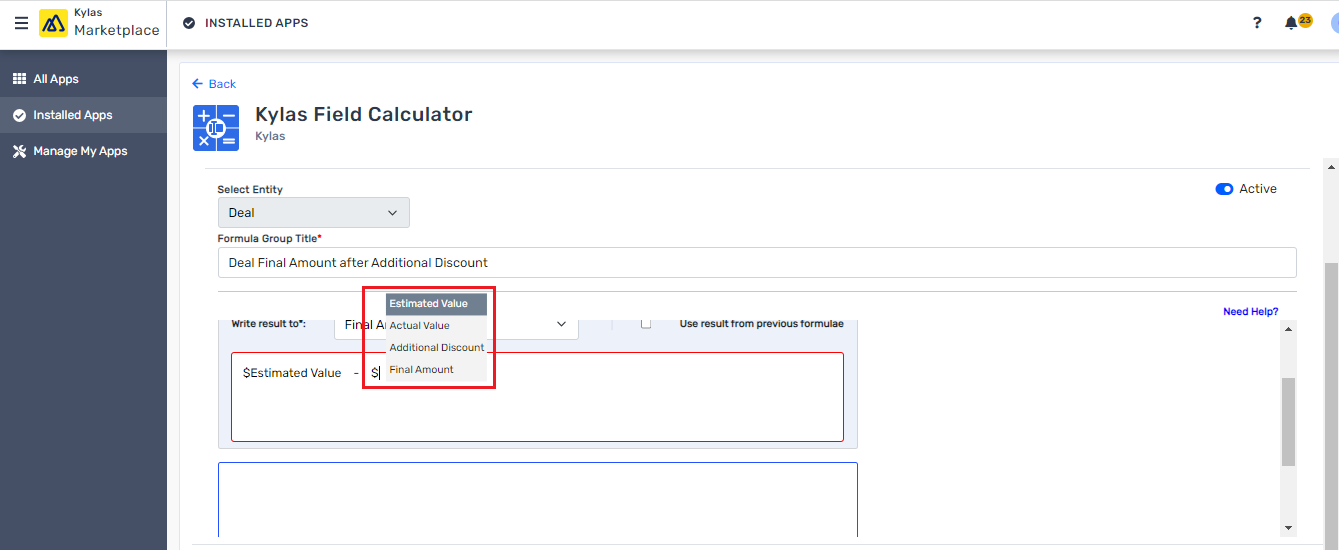
- Enter/Type '$' in the '$add expression' to view/choose the number field for the calculation. You can also use multiple operators for calculation such as
- +, -, / and *
- Comparison operators: Greater Than (>), Less Than (<) Equals (=) in an IF condition [E.g. (if($Field1 >= 5, 3, 4) will return 4 when $Field1 is 2]
- Percentage Calculation - ($Field1 * 10%) - $Field2
- Add more fields or create another formula and then save the field relation for the calculation.
- How to Use the Set Formulae
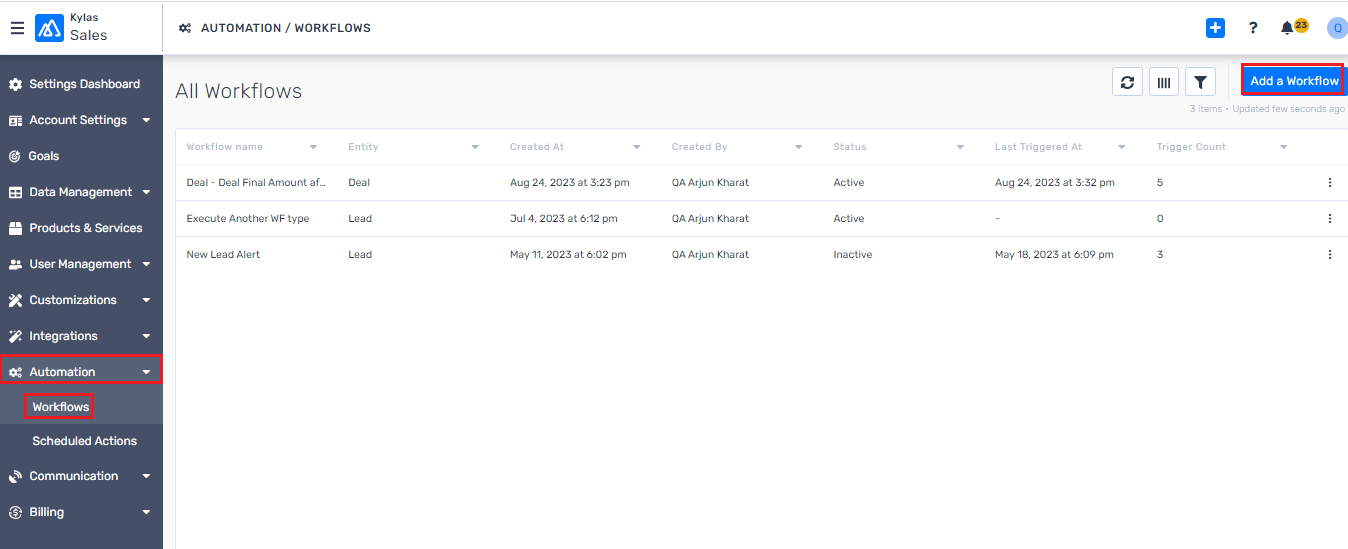
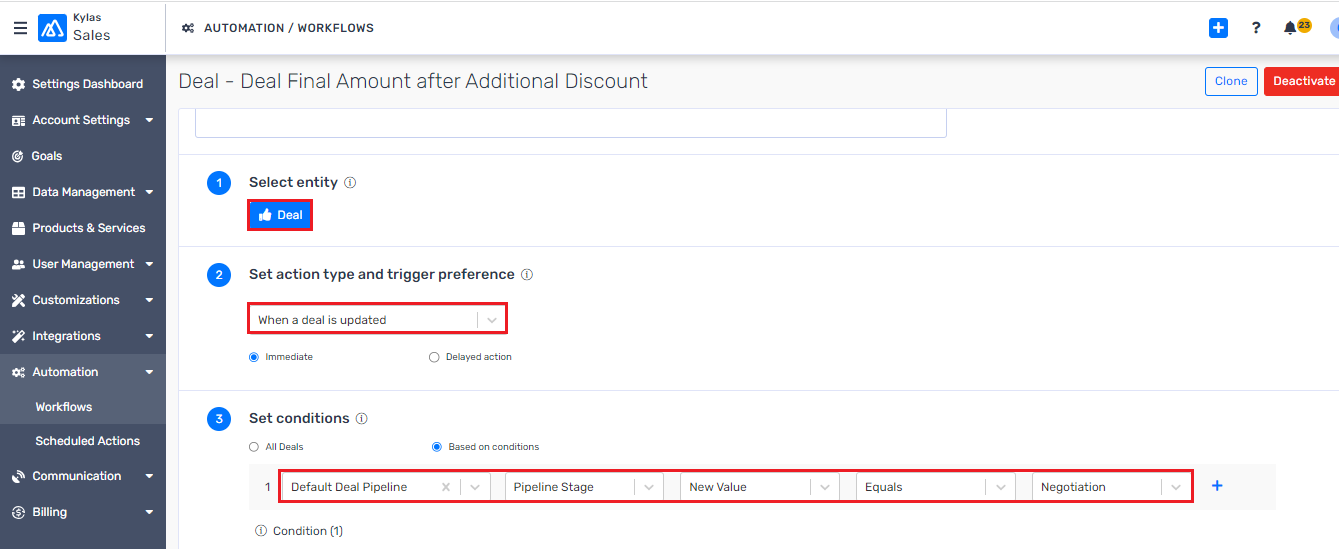
- Go to the Kylas Sales -> Automation -> Workflows -> Add a Workflow
- Set-up workflow for the same entity used for formula setup.
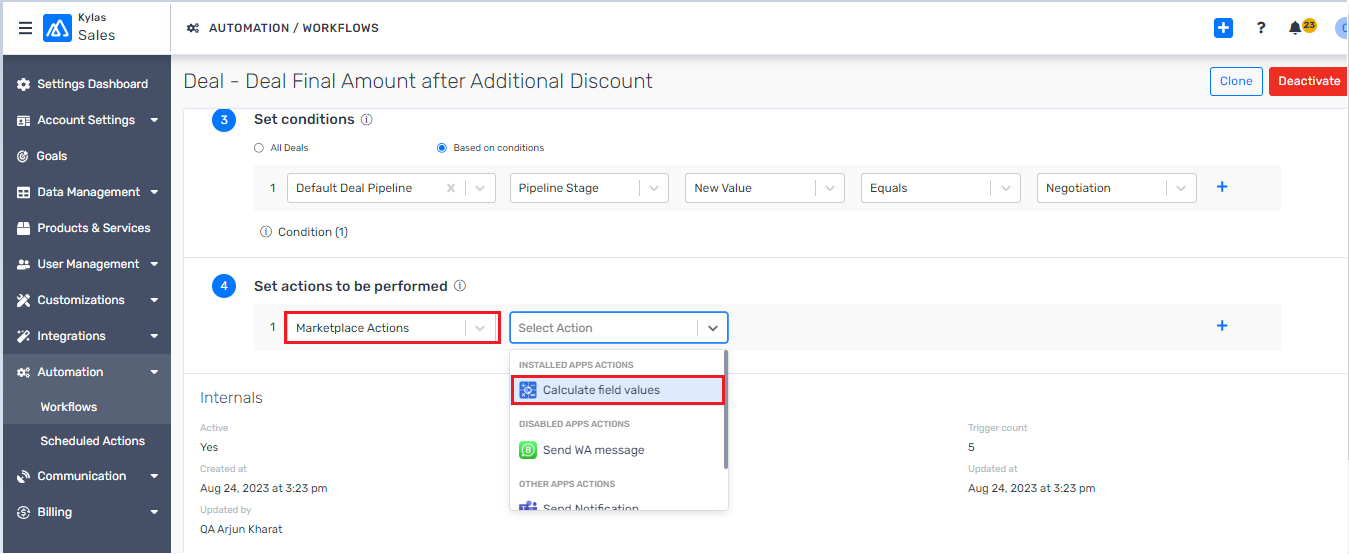
- In the action drop-down, select 'Marketplace' and then 'Calculate field values' from the next drop-down.
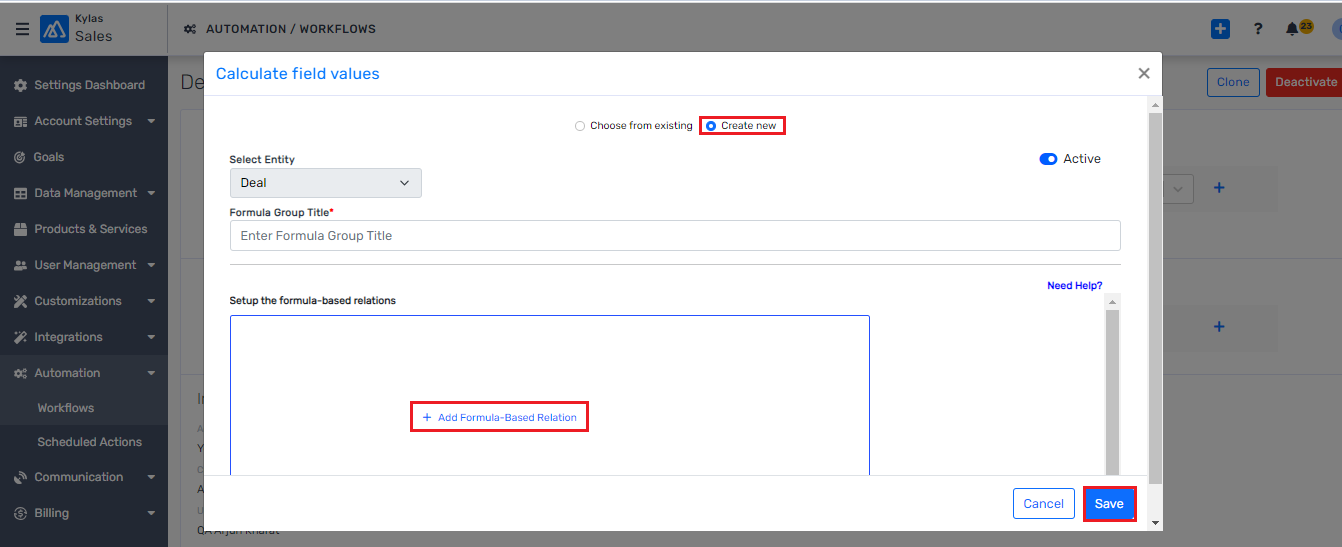
- Select the formula from the drop-down to perform the calculation action when the business condition meets.
- You can set/create a real time formula from the 'Create new' option available on the top and the system will automatically select the entity type based on workflow entity.
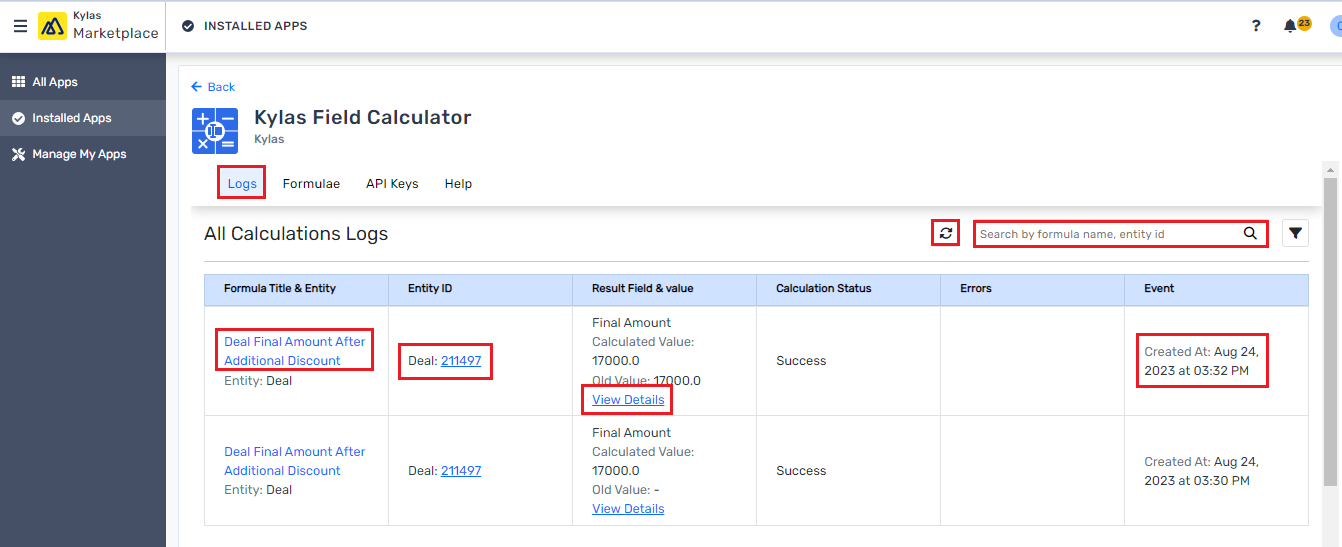
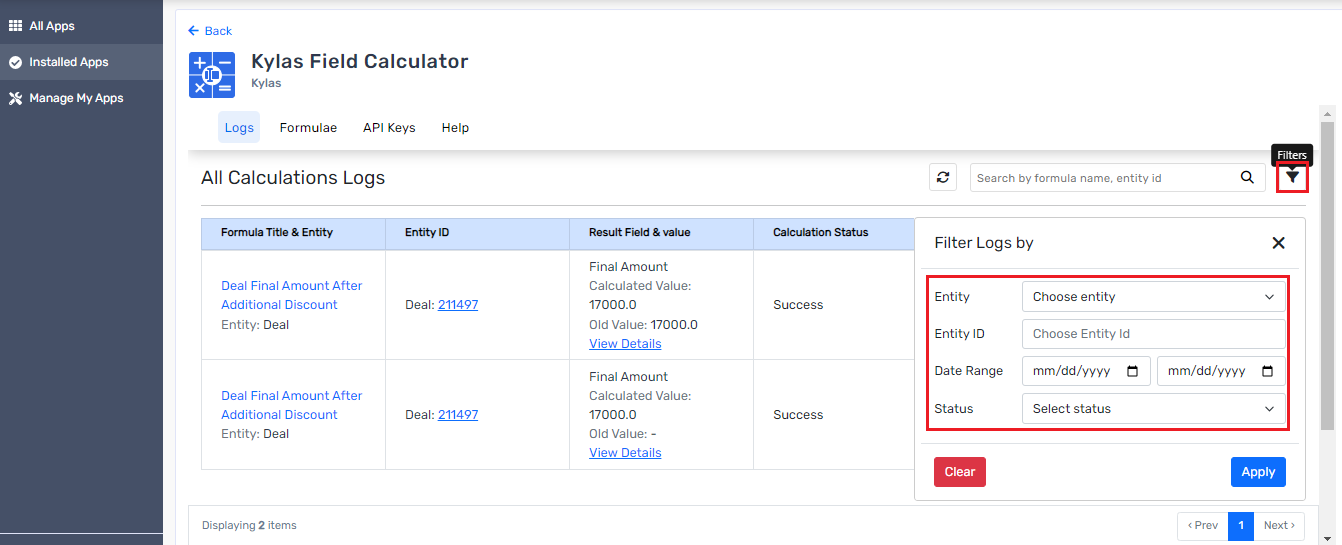
- View all your performed calculation details under the logs tab along with the below details
- Entity ID on which the calculation was performed.
- Which formula was used
- View the change details
- Activity timestamp details
- Look for a specific detail with the help of filter option.
Comparison Operators:
<(Less Than),>(Greater Than),<=,>=,!=(Not Equal),=(Equal)Example:
if($Field1 >= 5, 3, 4)→ returns 4 if $Field1 = 4
Logical Operators in IF:
AND,OR,XOR,NOTExample:
if(($Field1 > 5 AND $Field1 < 10), 7, 15)→ returns 7 if $Field1 = 8
Aggregation Functions:
MAX($Field1, $Field2)→ returns the larger valueMIN($Field1, $Field2)→ returns the smaller valueCOUNT(10, 15, 20)→ returns 3AVG(5, 10, 15)→ returns 10SUM(5, 10, 15, 20)→ returns 55
Rounding Functions:
ROUND($Field1, 2)→ rounds to 2 decimal placesROUNDUP()andROUNDDOWN()are also supported.
Commission Calculation:
(Deal Value * 10%)to auto-populate sales commission.Discounted Price:
($Price - ($Price * $Discount%)).Lead Scoring: Use
IFconditions to assign scores based on lead attributes.Stage-wise Deal Value Tracking: Aggregate deal values by stage for pipeline forecasting.
Target Achievement:
if($ClosedDeals >= $Target, "Achieved", "Pending").Expense vs Revenue Analysis:
SUM($Revenue) - SUM($Expenses)for profitability insights.Automation of Complex Calculations: Reduces manual effort and human error.
Real-Time Accuracy: Formulae run automatically via workflows.
Flexibility: Works across multiple entities (Leads, Deals, Products, etc.).
Scalability: Add multiple formulae to a group for layered calculations.
Transparency: View logs to track what formula was used and when.

5. Advanced Formula Options
The Field Calculator supports advanced logical and numerical operations:
6. Use Cases
Here are some real-world scenarios where the Field Calculator can be applied:
7. Benefits
8. Conclusion
The Kylas Field Calculator App empowers businesses to automate complex mathematical and logical operations directly within their CRM. From commission calculations and lead scoring to advanced conditional workflows, it provides flexibility and control without requiring coding.
By integrating formulae with workflows, you ensure real-time execution and consistency across your sales processes. Whether you need simple arithmetic or multi-layered logic, the Field Calculator is a powerful tool to boost productivity, improve accuracy, and give your team actionable data at their fingertips.
Related Articles
How to use Kylas Setu application for KYC purpose?
Verifying customer identity is a critical step in building trust and ensuring regulatory compliance. The Setu Marketplace App, now available on Kylas CRM, allows businesses to initiate and manage KYC (Know Your Customer) verification seamlessly using ...How to use Apollo.io for Prospecting in Kylas ?
Prerequisites Profile Permissions: Lead -> Read, Read All, Write, Update, Update All permission Contact -> Read, Read All, Write, Update, Update All permission Company -> Read, Read All, Write, Update, Update All permission Pipeline -> Read, Read All ...How to use Campaign influence marketplace app to copy campaign related activities from meeting?
Overview The Campaign Influence App in Kylas CRM helps link campaign and UTM data to Meetings by prioritizing information from associated Leads, Deals, and Contacts. This ensures better visibility into how marketing efforts are influencing sales ...How to add marketplace app trigger as a trigger event for Kylas workflow?
This article covers the steps to perform in order to add a marketplace app trigger as the workflow trigger event. This will enable you to let a workflow get triggered by an external event taking place in a marketplace app and you can use this for ...How to setup a Digio Markeplace app for KYC and Digital document sign?
Digitally verifying your customers' identity and obtaining e-signatures on documents has become essential in streamlining onboarding processes and ensuring compliance. The Digio Marketplace app simplifies this by enabling Kylas CRM users to initiate ...